


NEWS
What Teachers Love About AI-Backed Classroom Management

Managing a K–12 classroom in 2025 comes with more challenges than ever. With students using multiple devices and online resources, and the need to maintain focus and reduce distractions, teachers face a lot. Platforms like Blocksi offer practical tools that help teachers, administrators, and district leaders manage screens, automate tasks, improve workflows, and enhance student learning outcomes.
How AI Helps Teachers Stay in Control
AI-powered dashboards allow teachers to monitor and manage student screens in real time, ensuring they stay on task without disrupting learning.
One Virginia educator described how having a dashboard that shows live screens and activity logs transformed their approach: teachers can now step in proactively instead of reacting to off-task behavior. An Illinois assistant superintendent highlighted the ability to message students individually without disrupting the class as “a game-changer for keeping everyone focused.”
What Makes Teachers Love These Tools?
Based on feedback we get from educators, these are the classroom features that make the biggest difference day-to-day:
| Feature | Teacher Benefits | District Benefits |
| Live screen monitoring | Allows proactive engagement and quick intervention to keep students on task. | Provides admins with classroom-level visibility and real-time insights. |
| Messaging & intervention tools | Enables teachers to manage student online activity in real time, including closing tabs, enforcing websites, sharing content, and sending individual messages without interrupting the class. | Monitoring student focus in real-time, enabling quick intervention when needed, and ensuring consistent support with minimal class interruptions. |
| Historical data & activity logs | Helps identify trends and potential problem sites, supporting targeted teaching strategies. | Supports data-driven decision making for administrators and district leaders. |
Platform integration | Seamlessly integrates with existing tools and LMS platforms that teachers already use and love, such as Google Classroom and Edpuzzle. | Smoother implementation, better adoption rates, and less disruption to instructional time. |
How Management Tools Improve Student Engagement
Teachers find that these tools help with more than just discipline; they also keep students engaged. By monitoring their activity and using intervention features, educators can make sure students stay focused on lessons instead of the next interesting game, sending their minds wandering elsewhere.
A principal in California shared, “Teachers can actively monitor student activity online and ensure they are actively engaged in the assigned program instead of web surfing. Students are less prone to distract themselves or attempt to circumvent attention. Most beneficial feature: Actively seeing student screens and being able to pause their computer or close a tab to get them back on task.” This feedback highlights how historical activity logs support teachers in tailoring instruction.
Making Classroom Management Easier for Administrators and Teachers
Classroom management tools also aid administrators and district leaders by providing insights into overall classroom performance, compliance, and technology usage. This ensures districts maintain consistent standards while giving educators autonomy in teaching.
Curious how schools handle K-12 cellphone bans and distractions? Check out our blog on using student device management tools to keep learning on track.
Real Stories from Classrooms Using Blocksi
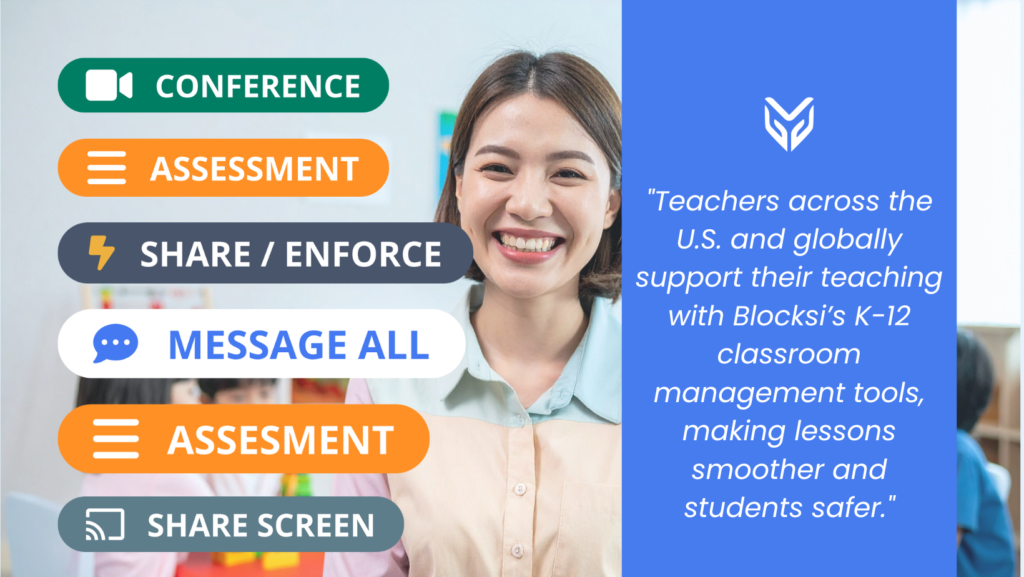
Teachers across the U.S. and globally support their teaching with Blocksi’s K-12 classroom management tools, making lessons smoother and students safer. A middle school teacher in Ohio uses the real-time dashboard to keep tabs on student screens, blending seamlessly with their existing setup to stay focused on teaching rather than tech issues. In California, a high school English teacher relies on messaging to quietly guide distracted students back on track without pausing class. A Virginia elementary educator checks activity logs to catch early signs of struggle, tailoring lessons to close gaps. An Illinois science teacher loves the intuitive interface, quickly addressing off-task behavior to keep lessons on point.
Classroom Management as a Strategic Ally
In 2025, effective teacher screen monitoring is a strategic tool for K-12 schools. Educators report that live screen monitoring, messaging tools, historical logs, platform integration, and multi-OS support make teaching more effective, students more engaged, and learning more impactful. District leaders can confidently invest in AI classroom management software for K-12 like Blocksi, which combines teacher-friendly features with decades of experience to optimize learning outcomes.
Eager to keep students on track? Try Blocksi’s free trial and see the difference!
FAQ
Can classroom management tools work on BYOD devices?
Yes, modern platforms support both school-owned and personal devices. Blocksi is multi-OS and covers Chromebooks, Windows OS, and Android devices.
Do these tools integrate with existing platforms like Google Classroom?
A: Absolutely, Blocksi integrates smoothly with LMS’s teachers already use frequently, minimizing setup disruptions.
Are historical activity logs compliant with privacy laws?
Blocksi meets FERPA, COPPA, CIPA, and SOC 2 standards, protecting student data while providing actionable insights, as trusted by districts.
Can these tools boost student engagement?
Yes, real-time monitoring and intervention tools keep students engaged and on task.
SOURCES
[1] Digital Distractions in Class Linked to Lower Academic Performance
[2] New research highlights the importance and challenges of K-12 student engagement
More to Explore
Follow Our Social Media Channels


