


NEWS
The Admin’s Guide to Tracking Student App Usage

If you are responsible for instructional technology in your district, you are likely managing dozens, sometimes hundreds, of digital tools. The real question is not how many tools you have. It is this: Are students actually using them? Tracking student app usage gives you real visibility into what is happening on school devices.
Instead of relying on vendor reports, teacher feedback, or renewal reminders, you can rely on actual activity data.
That matters for three reasons:
- You need clear EdTech usage data before renewal season.
- You are under pressure to improve EdTech ROI.
- You want to streamline your school tech stack, not expand it.
Without usage data, decisions become guesses. And guesses cost money.
What Is Tracking Student App Usage Really About?
Tracking student app usage means measuring how often district-approved apps and websites are actually accessed, by whom, and for how long.
In fact, school districts used an average of 2,591 different EdTech tools in the 2022–23 school year, according to LearnPlatform by Instructure—up slightly from 2,547 the previous year. With that level of volume, visibility is no longer optional.
It answers practical questions like:
- Which licensed apps are rarely opened?
- Are high-cost tools being used across grade levels—or only by a small group?
- Are students spending time on tools aligned with instructional goals?
- Are certain apps causing bandwidth strain or filtering challenges?
As pandemic-era funding such as ESSER winds down, districts are becoming more selective, focusing on data security, privacy, and evidence-based results rather than simply maintaining a large number of tools.
This is not about surveillance. It is about visibility. When you understand real usage patterns, you can make informed decisions about budgeting, filtering, and instructional support.
How Does App Usage Data Improve EdTech ROI?
Most districts renew software annually. Many renew out of habit. When you track student app usage consistently, you can:
- Identify underused licenses before renewal deadlines.
- Compare adoption across schools or grade levels.
- Align spending with actual instructional impact.
- Reduce duplication across departments.
This is where EdTech budget optimization becomes practical, not theoretical. Instead of asking, “Do teachers like this tool?” you can ask, “Is it being used consistently, and does the data support renewal?”

District leaders we speak with often say the same thing: seeing real numbers changes the conversation. It shifts decisions from opinion to evidence.
Are You Evaluating EdTech Tools or Just Adding New Ones?
A common challenge in K–12 is tool sprawl. Over time, districts accumulate platforms for benchmark testing, classroom engagement, communication, intervention, digital citizenship, assessment, and grading.
Each tool may solve a real problem. But together, they create complexity. If you are wondering how to evaluate EdTech tools effectively, usage data should be part of your evaluation framework.

Consider adding these checkpoints:
- Is the tool used weekly, monthly, or rarely?
- Is usage consistent across campuses?
- Does it replace another platform or duplicate it?
- Are students engaging meaningfully, or just logging in?
Tracking student app usage helps you see overlaps and gaps. It shows you where you can realistically consolidate tools.
What Should District Leaders Be Looking at Specifically?
When reviewing app usage, focus on metrics that support real decisions rather than surface-level numbers.
Useful indicators include:
- App frequency trends over time
- Usage by grade band or school
- Time-on-app comparisons
- Low-usage licensed platforms
This type of EdTech usage data supports renewal planning, filtering adjustments, and instructional strategy alignment.
For example, if a high-cost LMS add-on shows minimal activity district-wide, that becomes a budget discussion. If a free collaboration tool dominates student device time, that may trigger a policy or instructional review.
How Can You Streamline Your School Tech Stack?
The goal is not fewer tools for the sake of fewer tools. The goal is clarity and control.
When you track student app usage consistently, you can:
- Retire tools that add complexity without impact
- Consolidate similar platforms
- Standardize core instructional apps
- Provide targeted training where adoption is low
Over time, this helps you streamline your school tech stack. Teachers face fewer logins. Students experience more consistency. IT teams manage fewer integrations.
Where Does App Usage Insight Fit Into This?
Some districts build manual reports using exported logs. Others rely on vendor dashboards. Both approaches can be fragmented.
A centralized view of app usage across classrooms and campuses simplifies decision-making. For example, tools like Blocksi’s App Usage Insights provide district-level visibility into application activity, helping tech teams monitor trends, identify underused licenses, and adjust filtering policies based on real patterns.
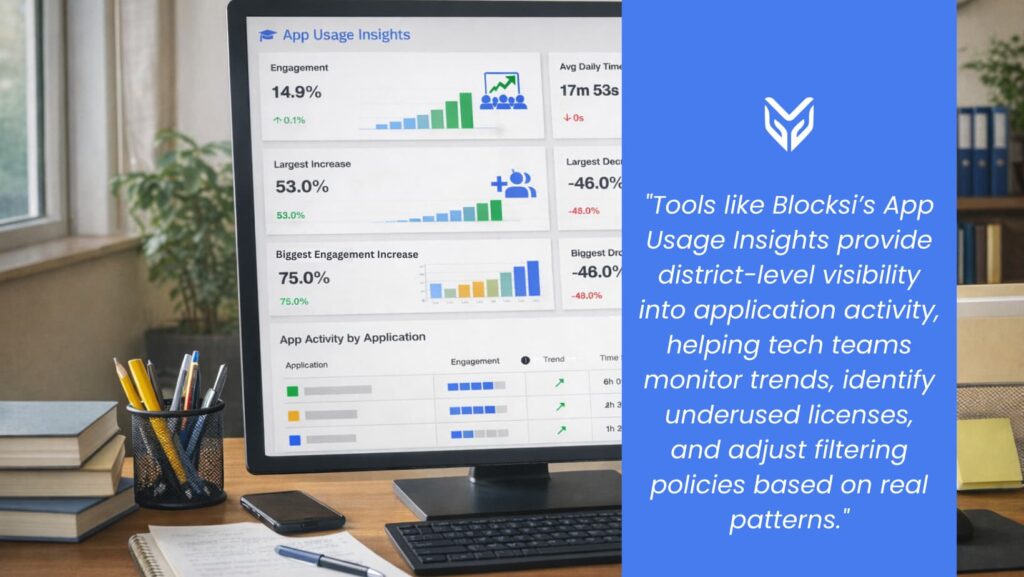
The real advantage lies in how the feature brings everything together into one clear, simplified view that supports budgeting, instructional alignment, and system administration.
When usage data is clear and accessible, conversations become faster and more productive.
Final Takeaway: Stop Guessing. Start Measuring.
Tracking student app usage is not about control. It is about clarity. When you have reliable EdTech usage data, you can improve EdTech ROI, optimize district spending, evaluate tools objectively, and streamline your school tech stack.
In 2026, the districts that make confident technology decisions will be the ones working from real data, not assumptions.
If you are not yet tracking student app usage systematically, now is the right time to start.
💡 Funding pressure did not disappear when the 2025 federal shutdown ended. The budgeting strategies districts used during that period still apply today. If you are reviewing technology spending in a tighter funding climate, this breakdown of K–12 funding strategies may help: K–12 Funding 2025 Shutdown Strategies.
FAQ
How often should districts review student app usage data?
At minimum, quarterly reviews help align usage trends with renewal cycles. Monthly checks provide better visibility into emerging patterns.
Does tracking student app usage help with budget planning?
Yes. Usage data highlights underused licenses and duplication, which directly supports EdTech budget optimization.
What is the difference between adoption and usage?
Adoption means a tool is approved or purchased. Usage means students and teachers are actively using it. Only usage data reflects real impact.
Can tracking usage improve instructional decisions?
It can. Patterns reveal which tools are embedded in daily instruction and which may need additional training or reconsideration.
SOURCES
[1] The EdTech Top 40: A Look at K-12 EdTech Engagement During the 2022-23 School Year
[2] Districts are more selective about edtech tools as they face a budget crisis
[3] Trimming the Edtech Fat: How Districts Are Streamlining Their Digital Ecosystems
More to Explore

Follow Our Social Media Channels


