


NEWS
New Integration: Blocksi Now Supports Wonde

Palo Alto, CA, June 10, 2026 — We’re pleased to announce that Blocksi now supports Wonde, a trusted school data integration platform used by 30,000+ schools globally. This new integration gives schools a direct and familiar pathway to sync roster data with Blocksi.
Wonde joins a growing list of supported integrations — including Google Classroom, Clever, ClassLink, and the 1EdTech OneRoster standard — giving schools around the world more flexibility in how they connect their school data to Blocksi.
What Wonde Does
Wonde acts as a secure bridge between a school’s Management Information System (MIS) and third-party platforms. With 60+ MIS integrations and reach across 60+ countries, it is a widely used rostering solution. For schools already using Wonde to manage their data, connecting to Blocksi is now straightforward.
What the Integration Syncs
Once connected, Wonde syncs the following data into Blocksi:
- Teachers — staff accounts are imported and ready to use in the Blocksi Admin Dashboard
- Classes and rosters — class structures and student enrollments are imported by teachers, with optional automatic daily sync
- Parents — parent accounts are imported, enabling visibility through the Blocksi Parent Dashboard
Setting It Up
For Admins
Start by connecting your school’s Wonde account to Blocksi. In the Admin Dashboard, go to Dashboard Settings → Teacher Dashboard. Under the Teacher Accounts section, click Import Teachers from Wonde. Enter your school’s Wonde ID and validate it. Once saved, you can import teachers directly from the same screen, and import parent accounts — including parent-student pairings — under Dashboard Settings → Parent Dashboard.
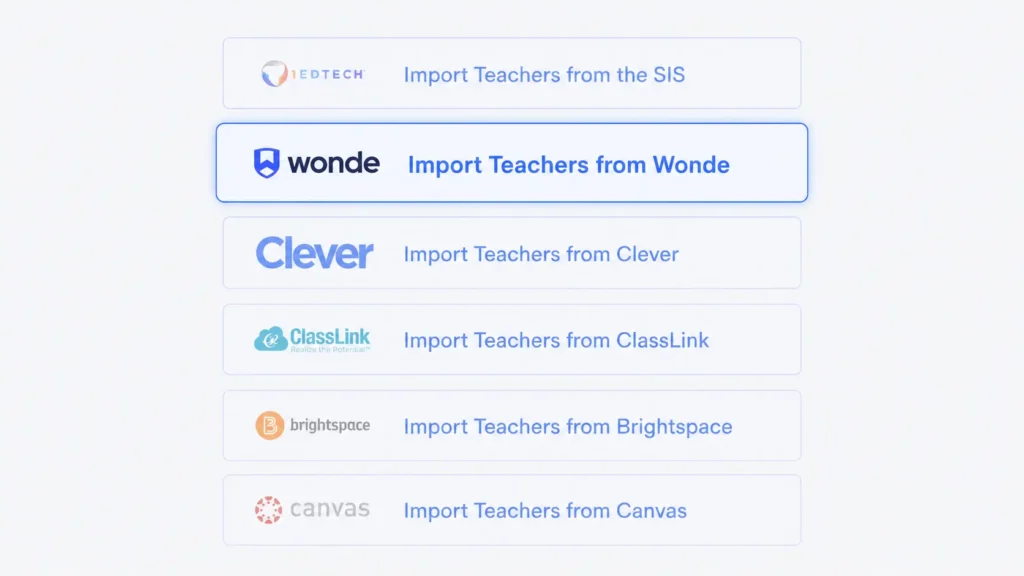
To keep parent accounts automatically in sync, enable the Sync Parents from Wonde toggle in the Parent Dashboard settings.
For Teachers
Once your administrator has configured the Wonde connection and imported your teacher account, you can import your classes directly from the Teacher Dashboard. Click the Wonde button on the dashboard, select the classes you want to import, and click Import. Blocksi can also keep your class rosters automatically in sync with Wonde on a daily basis — ask your administrator to enable the Wonde Class Sync toggle under Dashboard Settings → Teacher Dashboard → General Settings.
Flexible Rostering for Every District
Blocksi supports a growing list of rostering and identity integrations to fit how your district operates. Whether your school uses Wonde or one of our other supported integrations, setup is designed to be straightforward and managed smoothly from the Blocksi Admin Dashboard.
For more information on supported integrations,
or contact your Blocksi representative.
Catch Up on What Else Is New
Follow Our Social Media Channels


