


NEWS
What’s New at Blocksi: Extended Replay, Google AI Controls, and More
Palo Alto, CA, June 1, 2026 — Over the last few weeks, we’ve shipped several updates across Blocksi — improvements that add to what teachers can do day to day, keep students better informed during class, and help IT admins stay in control. Here’s a look at what’s new.
Session replay now covers 30 days
The Session Replay window has been extended from 14 to 30 days. Teachers can now look back further when reviewing screen activity, whether that’s following up on a student’s progress, revisiting a session for instructional purposes, or referencing earlier activity in a conversation with a parent or administrator. The extra two weeks of history means those moments are easier to find when you need them.
A new control for Google Search during class
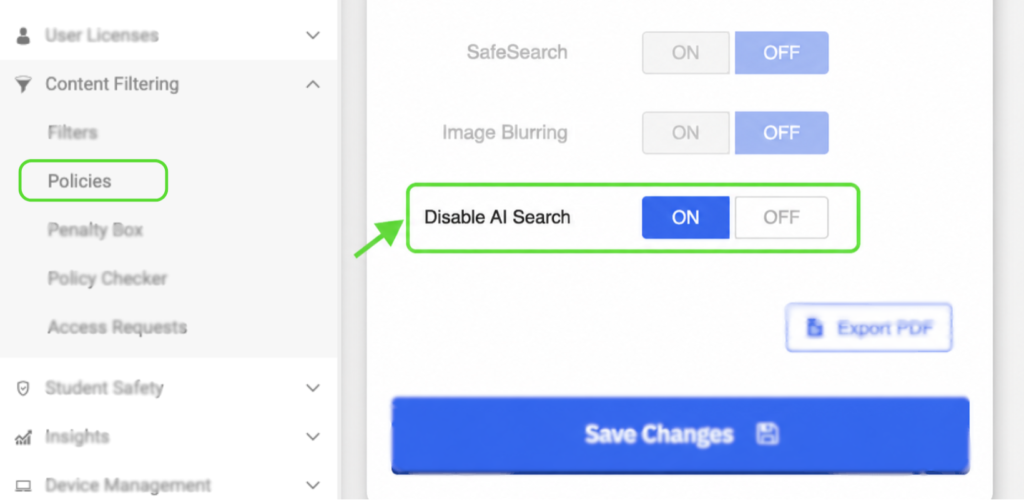
Administrators can now prevent Google AI summaries and generative results from appearing during student searches. When enabled, students see standard search results only — no AI overviews, no AI-generated summaries. It’s a straightforward control for schools that want to keep students engaging with source material rather than AI-generated answers.
To enable it, go to Admin Dashboard → Content Filtering → Policies. Select your policy and look for the Disable AI Search option.
In-class messages are now more visible for students
Teacher messages sent during class are now more visible. Students see a persistent green banner at the bottom of their screen that stays visible until acknowledged, and a badge on the floating menu icon shows an unread message count. Clicking either takes the student directly to the Blocksi Chat tab. No configuration needed — this is already live for all users.
Block and Allow Lists now support CSV export
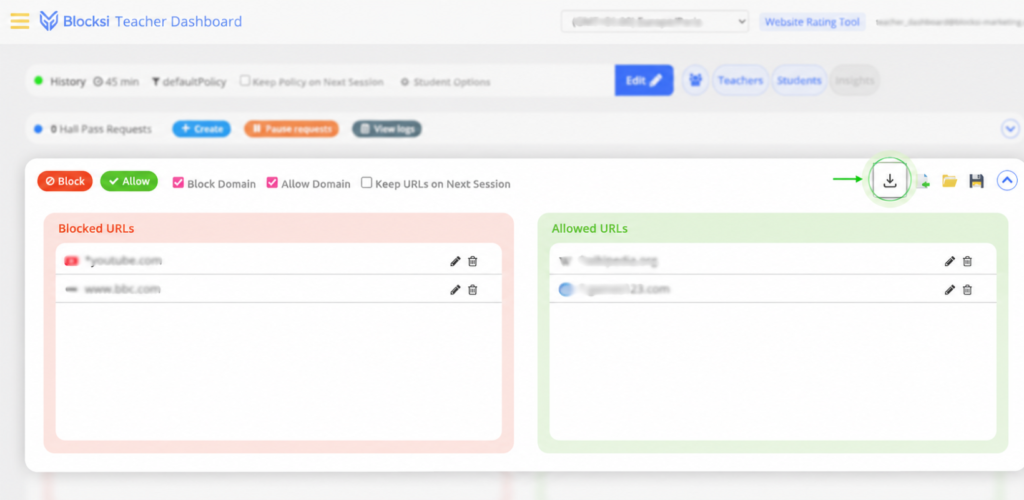
Teachers have always been able to build, save, load, and import Block and Allow Lists in the Teacher Dashboard, creating a focused browsing environment tailored to each class session. CSV export is now an option as well. Whether you’re backing up your current setup or sharing a list with a colleague for them to import into their own session, it’s now straightforward to take your list with you.
These updates are part of our ongoing effort to ship improvements that matter in practice — across every role that relies on Blocksi to keep schools running smoothly.
Want to see what Blocksi can do for your school or district? Visit Blocksi’s website to learn more or request a demo.
Already a Blocksi user? Join the conversation on our Community Forum to stay up to date with the latest news and connect with other schools.
Catch Up on What Else Is New

Follow Our Social Media Channels


