


NEWS
Class Scheduler: Automation That Works While You Teach

Managing a full school year of classes can get complicated fast, especially with block schedules, rotating weeks, and changing routines. That’s where Blocksi’s Class Scheduler simplifies the process.
Available directly in the Teacher Dashboard, Class Scheduler helps teachers organize their class schedule for the entire school year in one structured, visual place.
But the real power of Class Scheduler goes beyond organizing time slots — it automates classroom management. By automatically triggering class sessions and activating pre-set classroom controls based on the schedule, it removes the burden of managing student devices from the teacher’s to-do list.
How Can Teachers Plan the Entire School Year Schedule in Blocksi?
With Class Scheduler, teachers can manage their teacher scheduling needs more efficiently and support stronger classroom management by planning ahead:
- Turn on the automatic class schedule toggle
- Set school start and end dates
- Build schedules for traditional or block-based timetables
Teachers choose the date range they want to cover, and the scheduler displays square week views representing the entire period. Each week can be assigned a scheduling template, making it easy to manage both consistent routines and special variations. Instead of constantly operating a classroom management tool during lessons, teachers set their structure once — and Blocksi handles the device environment automatically in the background.
Designed for Block Scheduling (and Beyond)
Class Scheduler supports flexible scheduling models, making it a powerful class scheduler solution for different school structures:
- Week A & Week B templates
Ideal for repeating weekly or bi-weekly schedules.
- Custom Week template
Perfect for exceptions, special events, or non-standard weeks.
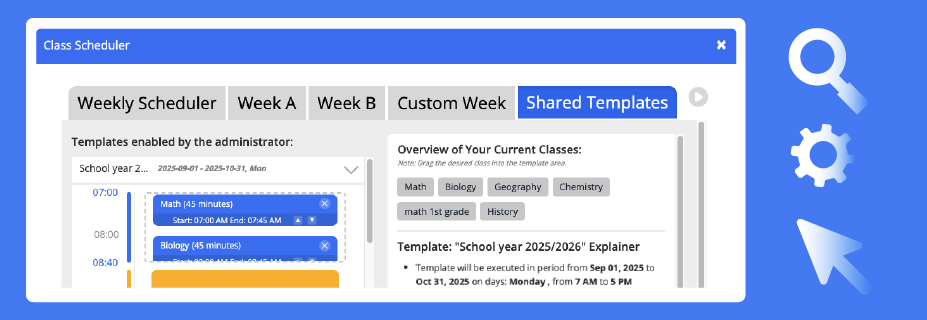
If a school doesn’t use block scheduling, teachers can simply apply the same template across all weeks.
Admins can also create Shared Templates that teachers can use, helping schools maintain consistency while still allowing classroom-level flexibility.
More Than Just Class Periods
Teachers can also:
- Add time blocks such as lunch and breaks
- Drag and arrange schedule elements easily
- See scheduled non-instructional times at a glance (e.g., lunch, breaks, schoolwide downtime)
From the teacher’s Class View, the current day’s schedule is visible at a glance, with status indicators showing what’s happening with each class.
Automatic Class Start & End
Class Scheduler works hand in hand with Blocksi’s class automation, connecting scheduling directly to automated class sessions.
Once a schedule is set, classes can:
- Start automatically at the scheduled time
- End automatically after the defined duration
For example, if Chemistry is scheduled from 8:00 to 9:30 AM, Blocksi will open and close that class session automatically — no manual start required. Students are released from class when the time is up, just like with manually created classes.
This means every student device is automatically placed into a controlled classroom environment without the teacher needing to manually start, adjust, or manage sessions. The system acts like an automated assistant, working in the background so teachers can focus on teaching, not tool operation.
A Simpler Way to Stay Organized
Instead of recreating schedules week after week, teachers can:
- Build their schedule once
- Adjust only when needed
- Keep everything visible in one place
Class Scheduler represents one of the first major steps in Blocksi’s broader vision of automated classroom management. It moves device control into the background so teachers can spend more time on instruction and less time managing software. All of this happens within the organized, teacher-friendly Blocksi Teacher Dashboard, where classroom management and instructional tools come together in one place.
You Might Also Find Helpful



Follow Our Social Media Channels


